
guide.md 1.5 KB
title 与 placeholder
如果传入了 title 而未传入 placeholder,Input 组件内部使用”请输入+title“作为默认 placeholder,title 和 placeholder 请至少传入一项。
type 与 inputmode
关于 inputmode 请参考 MDN 。
针对移动端交互特性,Input 组件主要用于输入文本,原生 input 标签的 type 值 file、radio、date 等有其他组件支持或交互方式,同时 type 与 inputmode 有高度重合性,type 的可选值在 inputmode 的基础上增加了 password 与 number。使用时一般只需要传入 type 即可,当然你也可以单独设置 inputmode。
因为在组件内部对输入内容做了一些处理,渲染为页面的最终 input 时 type 除了 password 外都会被转成 text,如需要请自行转换类型。
可配置项
Input 组件的所有可配置项位置如下图所示。
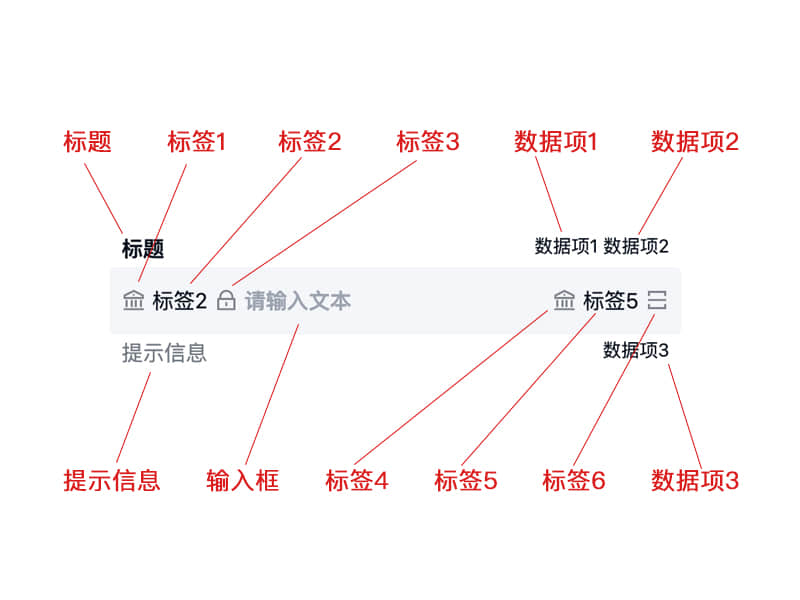
一般 label1、label3、label4、label6 用 Icon Props,label2 与 label5 用文字。
当然,如果这些配置项不能满足需求,它们也都支持使用插槽渲染,请参考示例。
textarea
textareaMaxlength、rows、autosize 三个参数只在 type 为“textarea”时生效,而且当 autosize 为 true 时 rows 将失效。
输入优化
输入中日韩文等各种包含“选字”环节的文字过程中,组件内部在对输入长度、内容等信息处理时,是在内容上屏后才做校验。